Our Location:
No. 99, Jiazi Road, Chengdu

 authorChris Lee
Choosing internet access for China is not simply a question of finding the cheapest SIM.
You need to solve three separate problems: mobile data, access to the international apps you use, and whether you actually need a Chinese +86 number. An international travel eSIM, mainland Chinese SIM and international roaming solve those problems differently.
This guide helps you choose before you land—and avoid buying the wrong product at the airport.
TripChina Local Note: Telecom products, device support, eSIM availability and activation rules change quickly. This guide was rechecked in September 2026 against current Chinese government and Apple information.
Quick Answer · Three Connectivity Problems · Travel eSIM vs Chinese Operator eSIM · International Travel eSIM · Device Compatibility · eSIM Installation & Activation · Mainland Chinese SIM · Chinese Phone Numbers · International Roaming · Which Option Fits Your Trip · Portable Wi-Fi · Data & Public Wi-Fi · Common Mistakes · Digital Setup · FAQ · Conclusion
International-app access depends on how the connection routes internet traffic. The words “eSIM” or “SIM” alone do not determine this.
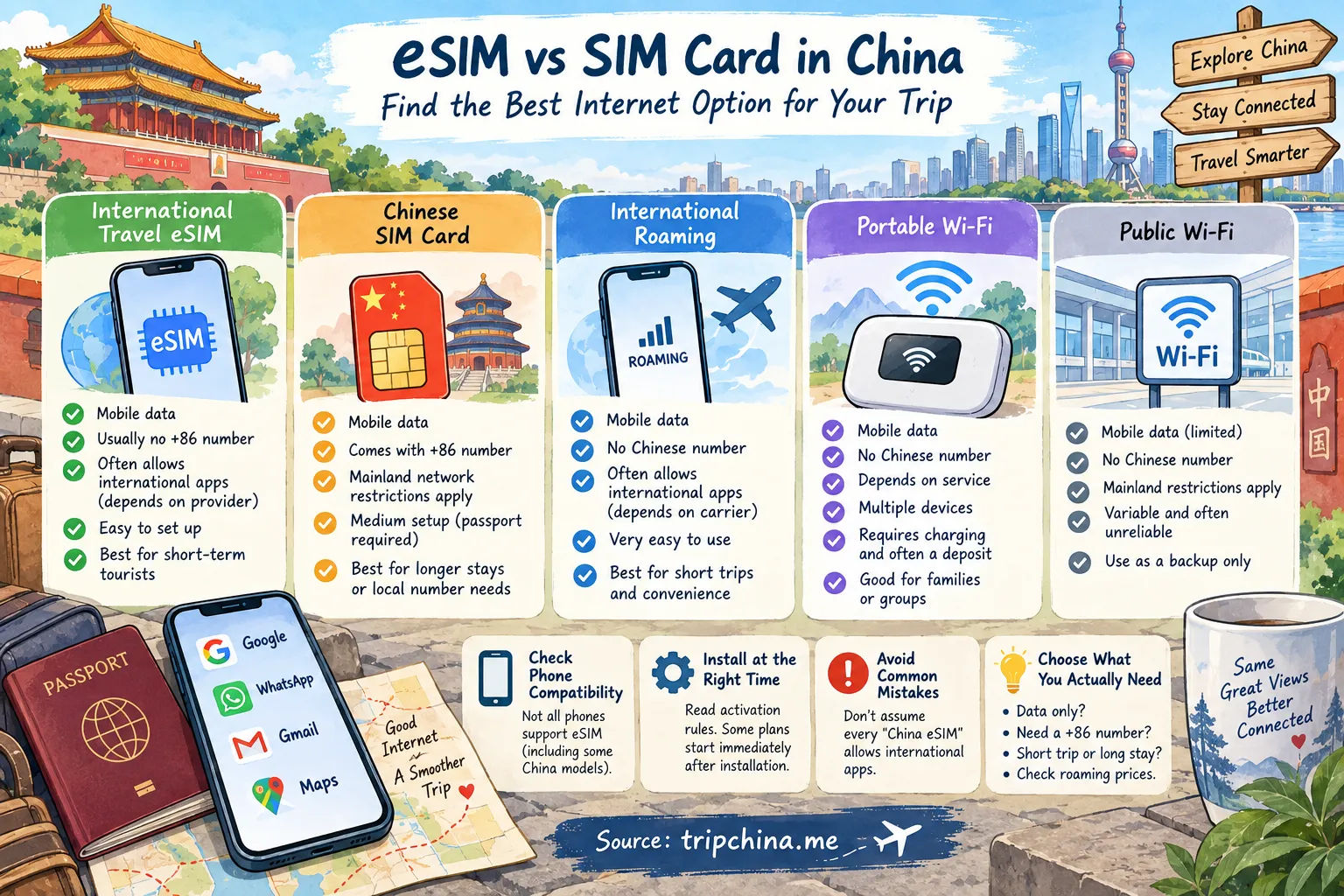
| Option | Mobile Data | +86 Number | International Apps | Setup | Best For |
|---|---|---|---|---|---|
| International travel eSIM | Yes | Usually no | Depends on routing | Easy | Most short trips |
| Mainland Chinese SIM | Yes | Yes | Mainland restrictions apply | Medium | Local number / longer stays |
| International roaming | Yes | No Chinese number | Depends on carrier routing | Very easy | Convenience |
| Portable Wi-Fi | Yes | No | Depends on service | Medium | Families / multiple devices |
| Public Wi-Fi | Yes | No | Mainland restrictions apply | Variable | Backup only |
TripChina Pick: For a typical 7–14 day sightseeing trip, compare an international travel eSIM with your existing carrier's China roaming package. Buy a mainland Chinese SIM only if you have a specific reason to need local mobile service.
Before comparing products, separate three questions that many China internet guides mix together.
Almost certainly.
Your phone may become part of the basic infrastructure of your trip. You are likely to use it for:
This is why I would not plan a first trip around hotel or airport Wi-Fi alone.
For many short-term tourists, no.
A local number can still be useful for longer stays, frequent local calls, SMS verification and some domestic lifestyle services. But older advice claiming that China is almost impossible without a Chinese number is increasingly outdated.
For example, DiDi-Greater China supports registration using overseas mobile numbers and international credit cards for foreign travelers.
China is also actively improving inbound digital services. In February 2026, 11 national departments issued measures covering telecom access, payments, tourism and other digital services for overseas visitors.
If you do, understand one principle:
Network routing—not whether the SIM is physical or electronic—is the important distinction.
An ordinary mainland Chinese mobile connection operates under mainland network restrictions. Some international roaming and travel-eSIM products route traffic differently.
For full details on traffic routing, read TripChina's dedicated guide to accessing Google, WhatsApp and other international apps in China.
This distinction became more relevant in 2026 as mainland-China eSIM support expanded to certain compatible iPhones while China continued improving telecom services for overseas visitors.
They are not the same product as the travel eSIM tourists usually buy before flying.
| Type | Who Provides It? | Typical Purpose | +86 Number | Network Type |
|---|---|---|---|---|
| International travel eSIM | Overseas/global provider | Tourist mobile data | Usually no | Provider-specific |
| Mainland operator eSIM | China Mobile / Telecom / Unicom | Domestic Chinese mobile service | Typically yes | Mainland network |
| Mainland physical SIM | Chinese operator | Domestic Chinese mobile service | Yes | Mainland network |
An international travel eSIM is usually a data product sold by a global or overseas provider.
A mainland operator eSIM is another form of domestic Chinese mobile service. The word “eSIM” does not make it equivalent to an overseas travel eSIM.
If international-app access matters to you, check the provider's routing details and use TripChina's guide to internet access in China for the full explanation.
For many short-term visitors, yes.
A travel eSIM is a digital mobile-data profile that lets a compatible phone connect without replacing your physical SIM card.
For a one- or two-week sightseeing trip, that can be remarkably convenient: you can prepare the phone before departure and arrive with your data setup largely finished.
The practical advantages are:
The last point is product-specific. Never infer routing simply from the words “China travel eSIM.”
Many travel eSIMs:
If you specifically need local calls, SMS or a Chinese number, a travel eSIM may solve only part of your problem.
Check this before paying for a plan.
Compatibility depends on the exact phone model, regional version and provider—not just the marketing name printed on the phone.
This is one of the easiest mistakes to make.
As of September 2026, Apple lists iPhone 17e (A3635) and iPhone Air (A3518) as the iPhone models supporting eSIM in mainland China. Other iPhone models cannot install eSIM profiles issued by mainland Chinese carriers.
But there are two completely different questions here:
Can the phone use a mainland Chinese operator eSIM?
and
Can the phone install an overseas travel eSIM?
For mainland-China-purchased iPhone 17e and iPhone Air models, Apple states that overseas carrier eSIMs can be activated while the phone is outside mainland China, but non-mainland-carrier eSIM profiles cannot be installed while the device is physically located inside mainland China.
Important practical warning: if you plan to use an overseas travel eSIM on one of these mainland-China models, install the profile before you enter mainland China. Once physically inside mainland China, you cannot install a non-mainland-carrier eSIM profile on those devices.
So do not rely on either oversimplified rule—“Chinese iPhones never support eSIM” or “if it supports Chinese eSIM, it can install any travel eSIM after landing.”
Check the exact model number and Apple's current compatibility information before buying.
Look for options such as:
Then verify the exact regional model on the manufacturer's website.
Do not assume two phones with the same consumer-facing model name have identical SIM hardware.
Usually, yes—but installation and activation are not necessarily the same thing.
I prefer to do as much setup as possible before departure while I still have reliable home internet.
The important part is reading your provider's activation rule.
Some plans start their validity period when the eSIM profile is installed. Others start only when the eSIM first connects to a supported network at the destination.
So the safe sequence is:
Do not follow a universal “install but never activate” rule without checking the provider. Different products behave differently.
A local SIM becomes more attractive when you specifically want:
As of September 2026, official telecom guidance confirms that foreign nationals can apply for SIM-card service using a passport or Foreign Permanent Resident ID Card at operators' self-operated service halls.
The major mainland operators include:
Plan availability and foreign-passport handling can vary by location.
Bring your original passport or another officially accepted identity document.
Your phone should also be:
Current official guidance says the applicant must appear in person when applying with a passport or Foreign Permanent Resident ID Card.
A carrier-locked phone can make an otherwise suitable Chinese SIM useless, so check with your home carrier before departure.
The most dependable official route is a self-operated service hall of a telecom operator.
China is also expanding telecom service points at high-volume ports and airports for overseas visitors.
Airport counters can be convenient because staff are more accustomed to short-term international arrivals. But availability, hours and plans vary, so check the specific airport rather than assuming every international terminal has the same service.
No.
Convenience is the airport counter's main advantage—not necessarily price or choice.
Available plans can be more limited than those at larger city service halls, so ask:
Do not assume a local-data plan includes international roaming or solves the separate international-app issue.
For an ordinary short sightseeing trip, often not.
The situation has improved substantially from the days when almost every China travel guide told visitors to obtain a local number immediately after landing.
For example, DiDi-Greater China officially supports overseas mobile numbers and international credit cards.
A Chinese number becomes more useful if:
For a 7–14 day sightseeing trip, buy one because you need its functions, not because an old blog says every tourist needs one.
If ride-hailing is your main concern, TripChina's DiDi guide for foreign travelers without a Chinese phone number explains the actual setup.
Sometimes.
Roaming is the lowest-effort solution because you keep your existing mobile account and do not need to buy or install another SIM.
Its biggest advantages are:
The disadvantage is usually price.
Some home carriers offer competitive China packages. Others charge expensive daily rates.
So before buying a travel eSIM, check what your existing carrier actually charges.
For a three-day business trip, paying more for roaming may be worthwhile. For several weeks of independent travel, the economics can look very different.
| Traveler | Best Starting Option | Why |
|---|---|---|
| 3-day business traveler | International roaming | Minimal setup |
| 7–14 day tourist | International travel eSIM | Strong convenience/value balance |
| 2–4 week tourist | Travel eSIM | Often more economical than daily roaming |
| Long-term visitor | Local SIM or eSIM + local SIM | Local-number needs become more relevant |
| Traveler needing +86 number | Mainland SIM | Provides domestic number |
| Phone without travel-eSIM support | Roaming or physical SIM | Avoids eSIM compatibility problem |
| Family with several devices | Individual eSIMs or portable Wi-Fi | Depends on device mix |
There is no universal “best China SIM.”
The correct choice depends more on trip length, device compatibility and whether you need a Chinese number than on the logo printed on the product.
It can make sense for a family or group carrying several devices.
One hotspot can connect multiple phones or tablets, which may be simpler than buying separate plans.
But there are trade-offs:
For a solo traveler with an eSIM-compatible phone, I would usually choose a phone-based connection instead.
Be aware that airport-rented portable Wi-Fi units may require a security deposit, and rental companies can charge additional fees if the device is lost or physically damaged. Check the rental terms before leaving the counter.
There is no useful universal “GB per day” answer.
Someone using maps, translation, messaging and DiDi consumes far less data than someone uploading videos, making video calls, streaming or continuously backing up photos.
Before traveling, check your phone's existing mobile-data statistics.
Then add a reasonable buffer.
This is more reliable than buying a plan based on an arbitrary travel-blog formula.
No—not as your primary connection.
Public Wi-Fi can be useful as backup, but login requirements, verification methods and reliability vary.
Having mobile data when you land immediately helps with:
That first hour after landing is exactly when you do not want to discover that your entire digital plan depends on unfamiliar public Wi-Fi.
For what to do immediately after landing, TripChina's China airport arrival guide for foreign travelers covers the practical steps before leaving the terminal.
| Mistake | Better Approach |
|---|---|
| Buying a product because it says “China eSIM” | Identify whether it is an international travel product or mainland operator service |
| Buying before checking phone compatibility | Verify the exact model and regional version |
| Installing without reading activation rules | Find out when the plan's validity period starts |
| Forgetting carrier lock | Confirm the phone is unlocked before relying on a local SIM |
| Buying a local SIM for international-app access | Treat mobile service and international-app access as separate questions |
| Assuming every tourist needs +86 | Identify the specific service that requires it first |
| Waiting until the airport to research everything | Choose your primary connection before departure |
The pattern behind almost all of these mistakes is the same: travelers buy a product before defining the problem they need it to solve.
Internet access is only one part of China's digital travel setup.
Before departure, I would also prepare:
China's official guidance allows overseas users to register supported payment apps using foreign mobile numbers and link eligible international cards.
TripChina's China payment guide for Alipay, WeChat Pay, cards and cash explains the payment side, while the China navigation-app guide for overseas visitors covers the mapping problem that often surprises first-time visitors.
For a broader pre-departure checklist covering connectivity, payments, apps and entry preparation, see TripChina's China Arrival Guide for Foreign Travelers.
For most first-time foreign tourists, the starting point is simple:
Compare an international travel eSIM with your home carrier's China roaming package.
Choose based on price, device compatibility, data allowance and the provider's current terms.
Add mainland Chinese mobile service only if you have a concrete reason to need a +86 number, local SMS, voice service or longer-term domestic connectivity.
Do not make your choice based on the word “eSIM” alone.
👉 Explore more essential travel tips in our China Basics Hub.
Often, yes, if your phone supports dual-SIM operation and you keep your home line enabled. However, your home carrier may charge roaming fees for certain services, so check its rules before departure.
Be especially careful that your phone does not accidentally use expensive home-line data roaming.
Sometimes. Personal-hotspot support depends on the eSIM provider and plan.
Check the provider's product description or FAQ before purchase—“personal hotspot” or “tethering” is usually explicitly listed when supported.
Some travel eSIM plans prohibit or restrict personal hotspot / tethering. Depending on the provider's terms, unsupported tethering may result in throttled speeds or service interruption. Confirm the tethering policy before buying.
First check that the eSIM line is enabled, the correct line is selected for cellular data, and data roaming is enabled if your provider requires it.
Save the provider's APN and troubleshooting instructions offline before departure so you are not dependent on the connection you are trying to repair.
VPN services and their use are subject to China's applicable laws and regulations.
This guide does not recommend or provide instructions for bypassing network restrictions. Check current local requirements and the terms of any service you use.
For most short trips, simplicity wins.
If your phone supports it, an international travel eSIM is often the easiest starting point. If your carrier offers affordable China roaming, roaming may be even simpler. If you genuinely need a +86 number or longer-term domestic service, a mainland Chinese SIM becomes more useful.
The most important lesson is not “eSIM beats SIM.”
It is this: decide whether you need data, a Chinese number, or both—then buy the service that actually solves that problem.
The simple rule: data only? Start with a travel eSIM. Need a +86 number? Consider a local SIM. Can't decide? Check your carrier's China roaming price first—it may be better value than you expect.
This article is part of the China Basics Hub. Browse TripChina's practical guides for preparing an independent trip to China.
Ministry of Industry and Information Technology — SIM Card Guide for Foreign Nationals — Passport requirements, in-person application and official telecom service channels.
Cyberspace Administration of China — Inbound Digital Services Measures — February 2026 measures covering telecom access and digital-service convenience for overseas visitors.
Apple Support — Using eSIM with iPhone in China Mainland — Current mainland-China iPhone eSIM compatibility and restrictions on installing non-mainland-carrier eSIM profiles.
Ministry of Commerce — Guide to Working and Living in China — Visitor guidance covering mobile services and inbound digital-service preparation.
Updated September 9, 2026. This guide was cross-checked against current Chinese telecom guidance, the February 2026 national inbound-digital-services measures, Ministry of Commerce visitor guidance, and Apple's current mainland-China eSIM documentation. Product-specific prices, routing, data allowances, tethering rules and activation policies change frequently and should be verified with the provider before purchase. Official Chinese-language sources were translated and summarized for this guide; Apple information was checked against its current official support documentation.
TripChina.me creates practical China travel guides shaped by real local experience, helping independent travelers navigate transport, payments, food, neighborhoods, and the cultural details that make traveling in China easier and more meaningful. Find the guide for your destination at tripchina.me.