Our Location:
No. 99, Jiazi Road, Chengdu

 authorChris Lee
If you land in China and your phone suddenly has no internet, don't start shopping for data plans. Your first goal is much simpler: get one temporary connection working. Test what is already on your phone first, then move to airport WiFi or an official SIM counter only if necessary.
Follow this order:
Best first move: Use a connection already configured on your phone before buying anything new.
| What You Still Have | First Action | Effort | If It Fails |
|---|---|---|---|
| Home SIM with signal | Enable data roaming | Very low | Check your carrier/account |
| Installed travel eSIM | Select it for mobile data | Low | Restart and check APN/provider instructions |
| No working mobile data | Try official airport WiFi | Low | Ask about passport authentication |
| Unlocked phone | Find an official carrier/service counter | Medium | Use hotel WiFi temporarily |
| No working phone connection | Use the airport help desk | Low | Leave only with offline hotel details and official transport |
Your home SIM is usually the fastest thing to test because it requires no new account, QR code or purchase.
On an iPhone:
Apple's current troubleshooting guidance recommends checking the active cellular line, enabling roaming for international travel, toggling Airplane Mode and restarting when needed.
Cost warning: International roaming can be expensive. If you do not know your plan, use it initially for essential tasks such as contacting your hotel, retrieving a booking or opening a map.
If the phone shows signal but still has no data, the problem may be with your carrier account, roaming authorization or data plan rather than the Chinese mobile network.
If the travel eSIM is already visible in your phone's settings, do not immediately assume it has failed.
Check:
• the eSIM line is switched on
• it is selected as the mobile-data line
• data roaming is enabled if the provider requires it
• the package has started and has not expired
• the correct network or APN is being used
• your home SIM is not still selected for cellular data
Then restart the phone.
TripChina Tip: Change one setting at a time and test again. If you change five settings simultaneously, you may have no idea which SIM is actually carrying the data.
Usually you need some working internet connection to download a new eSIM profile.
That means airport WiFi, hotel WiFi or another temporary connection can technically act as a bridge, though purchasing and downloading a brand-new eSIM after landing is far less convenient than installing it before departure.
An eSIM that was already installed before departure is much easier to recover than one you have not downloaded yet.
For choosing between the two before your trip, see TripChina’s eSIM vs physical SIM comparison guide.
At several major Chinese airports, yes.
This is one of the most useful changes for international travelers. Do not assume every airport WiFi system still requires a Chinese-number SMS code.
As of September 2026, official sources confirm passport or identity-document authentication at major hubs including Beijing Daxing, Shanghai Pudong and Hangzhou Xiaoshan.
| Airport | Official WiFi / Method | Foreign-Traveler Login Method |
|---|---|---|
| Beijing Daxing (PKX) | BDIA-FREE-WIFI | Photograph passport information page on authentication screen |
| Shanghai Pudong (PVG) | Airport free WiFi | Passport photo-page verification available without a local SIM |
| Hangzhou Xiaoshan (HGH) | HIA-Free-WiFi | SMS, identity document or self-service terminal authentication |
| Other airports | Varies | Ask whether passport / 证件 authentication is available |
This does not mean every terminal and every airport in China works the same way.
Typically:
At Beijing Daxing, the official process specifically allows foreign visitors to connect to BDIA-FREE-WIFI by photographing the passport information page.
At Hangzhou Xiaoshan, the airport lists SMS, identity-document authentication and WiFi self-service terminals as available methods.
Try this:
If the page still does not appear, stop fighting with your phone and ask airport staff.
Show them this sentence:
“WiFi 登录页面打不开,请帮我连接。”
(The WiFi login page won't open—please help me connect.)
Avoid open networks whose names merely look similar to the official airport WiFi.
If both mobile data and WiFi fail, an official information desk is more useful than randomly changing network settings.
Show or say:
“I have no mobile data. Can you show me the official WiFi or SIM card counter?”
Airport staff may be able to:
• show you the correct WiFi network
• explain passport-based authentication
• locate a communication-services counter
• help contact your hotel
• point you toward the official taxi or transport desk
Keep your hotel name and Chinese address saved offline (critical if you end up leaving the airport without connectivity).
A Chinese address screenshot can be more useful than another travel app when your phone has no connection.
Buy one when you actually need one—not automatically because your travel eSIM failed for three minutes.
A physical mainland SIM is especially useful if:
• your phone does not support eSIM
• your international roaming does not work
• you need a Chinese mobile number
• you are staying for a longer period
• you want a stable local-data fallback
Major international airports increasingly provide communication services for inbound foreign passengers.
For example, Shanghai Pudong's international-arrivals service areas provide SIM-card services, and its one-stop international service center allows foreign travelers to apply for short-term China Telecom SIM cards using a passport or other valid identification.
You will generally need:
• your original passport
• an unlocked and compatible phone
• an accepted payment method
• time for real-name registration and activation
Before leaving the counter, ask the staff to prove that mobile data works on your phone.
Do not accept a sealed SIM and walk away assuming everything is configured correctly.
Not necessarily.
A mainland Chinese SIM solves local connectivity: mobile data and, depending on the plan, a Chinese phone number.
It does not automatically mean every international internet service you normally use will behave exactly as it does at home.
That is why “Which SIM should I buy?” and “How do I get international internet access in China?” are different questions.
For the broader distinction, read the full overview of internet access for tourists in China.
Yes. Treat hotel WiFi as a temporary bridge.
Once connected, you can:
• contact your mobile carrier
• troubleshoot or download an eSIM
• retrieve booking information
• message family
• prepare maps and transport information
• set up other apps you need
Some hotels require a room number, surname, WiFi password or another authentication step.
If the login screen is confusing, ask reception to connect your phone rather than spending 20 minutes guessing.
Hotel WiFi does not have to be your final data solution. It only needs to get you unstuck.
Sometimes the best decision is simply to reach the hotel safely and solve the internet problem there.
Before leaving the terminal, make sure you have:
• your hotel's English and Chinese name/address saved offline
• booking confirmation screenshots
• hotel telephone number
• enough battery
• a clear official transport option
Use the official taxi queue, airport rail/metro where practical, or a staffed transport counter.
Do not let the stress of having no internet push you toward an unofficial driver or an unverified SIM seller.
For the complete post-landing process, see the full China airport arrival guide for foreign visitors.
| Mistake | Better Approach |
|---|---|
| Testing only Google or another overseas app | Test a basic webpage before deciding mobile data itself is broken |
| Changing every network setting together | Change one setting, test it, then continue |
| Buying a SIM immediately | Test roaming, installed eSIM and airport WiFi first |
| Assuming airport WiFi requires Chinese SMS | Look for passport / document authentication |
| Using unofficial WiFi or SIM sellers | Use airport staff or identifiable carrier/service counters |
| Leaving without an offline address | Save your hotel name, Chinese address and booking before departure |
The biggest diagnostic mistake is confusing “this app does not open” with “my phone has no internet.”
Those are not always the same problem.
The best emergency fix happens before you board.
Save offline:
• hotel name and Chinese address
• hotel telephone number
• booking confirmation
• passport and visa copies
• flight details
• your eSIM provider's installation instructions
• essential transport information
And install/configure your important travel tools before departure whenever possible.
See TripChina’s guide to essential apps for foreigners in China for the apps worth preparing before you land.
👉 Explore more essential travel tips in our China Basics Hub.
A carrier-locked phone may prevent you from adding another carrier's physical SIM or eSIM. Airport WiFi and your existing home-carrier roaming may still work, but buying a Chinese SIM will not solve the lock itself. Check your phone's carrier-lock status before traveling.
At some major airports, yes. Beijing Daxing specifically provides passport-authenticated WiFi to inbound foreign passengers so they can complete arrival procedures online, and Shanghai Pudong provides arrival-area connectivity assistance. Exact locations and availability vary by terminal.
Not necessarily. Many essential tourist tasks can be handled using mobile data, roaming or airport/hotel WiFi. A mainland number becomes more useful if a specific service requires local SMS verification or if you are staying longer.
Use identifiable official counters or ask the airport information desk where to go. Your passport is required for real-name SIM registration, so do not hand it to an unverified seller.
The captive-portal login must complete before internet traffic starts flowing. Disable any auto-VPN, disconnect and reconnect to the WiFi network, then open a basic webpage to trigger the login window.
If authentication finishes but you still have no connectivity, ask airport staff for help rather than repeatedly changing your phone's network settings.
If you arrive in China without internet, do not turn the first hour of your trip into a shopping comparison.
Use this order:
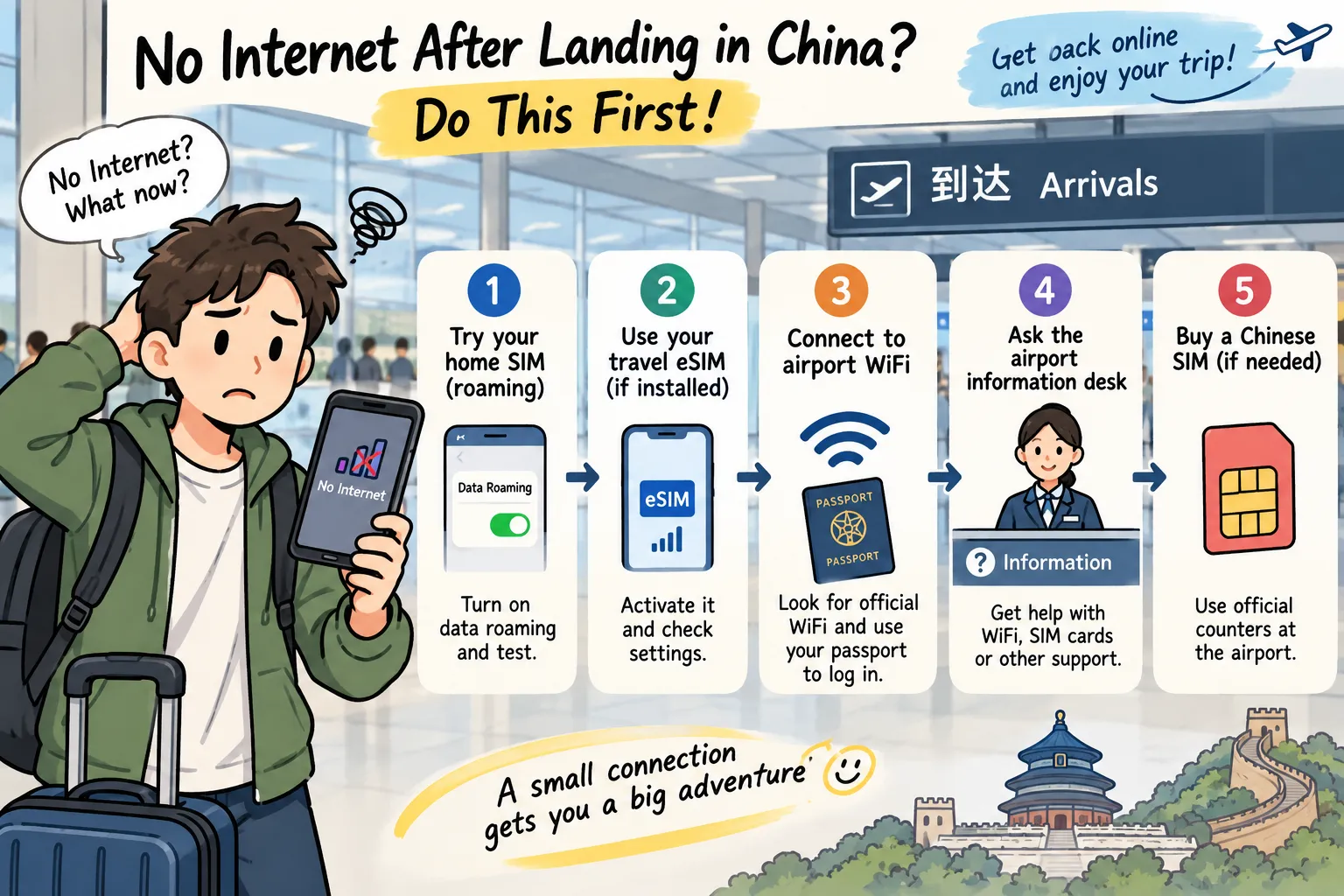
Home roaming → installed eSIM → official airport WiFi → airport help desk → official physical SIM.
The key improvement as of 2026 is that foreign visitors at several major Chinese airports can now authenticate WiFi using a passport or other identity document, instead of relying solely on a Chinese-mobile-number SMS code.
Get one connection working first.
Then contact your hotel, retrieve your bookings and get moving. Once you are settled, you can decide which long-term internet setup actually fits the rest of your trip.
Apple Support — International Cellular Troubleshooting
Beijing Municipal Government — Daxing Airport Passport-Based WiFi
International Services Shanghai — Pudong Airport Services for Foreign Travelers
Hangzhou Xiaoshan International Airport — Passenger WiFi Service
Updated September 7, 2026. Roaming troubleshooting was checked against current Apple support guidance, while airport WiFi authentication and inbound communication services were verified through Beijing, Shanghai and Hangzhou official sources. Passport-based WiFi is confirmed at several major Chinese hubs, but this guide does not assume that every Chinese airport uses the same system. SIM-counter opening hours, tourist plan offerings and WiFi-authentication workflows vary between terminals. Always confirm on-site conditions with official airport staff.
TripChina.me creates practical China travel guides shaped by real local experience, helping independent travelers navigate transport, payments, food, neighborhoods, and the cultural details that make traveling in China easier and more meaningful. Find the guide for your destination at tripchina.me.