Our Location:
No. 99, Jiazi Road, Chengdu

 authorChris Lee
The first digital shock for many visitors to China is not the language barrier — it is paying for things. QR payments are everywhere, from coffee shops and restaurants to taxis and convenience stores.
The good news is that foreign visitors can now link eligible international cards to WeChat Pay without a Chinese bank account. This guide shows you how to set it up, what it costs, what international cards can and cannot do, and how to fix the problems travelers actually encounter.
Yes. As of September 2026, international visitors can register WeChat with an overseas phone number, link eligible international bank cards, complete passport verification when requested, and use WeChat Pay for everyday purchases in mainland China.
| Question | Answer |
|---|---|
| Chinese phone number required? | No — an eligible overseas number can be used |
| Chinese bank account required? | No |
| Passport verification available? | Yes |
| International cards supported? | Visa, Mastercard and several other major networks |
| Merchant QR payments? | Yes |
| Payment-code payments? | Yes |
| Transfers / red envelopes funded by foreign cards? | Generally not supported |
| Standard international-card fee | ¥200 or less: fee waived; above ¥200: normally 3% |
| 2026 new-user promotion | Eligible first-time international-card users can receive a 90-day fee waiver on eligible spending within a ¥1,000 daily allowance |
| Spending limits | Account-dependent; see the verified-user ceilings below and check your own account before a large purchase |
The important point is that WeChat Pay does not have one universal spending limit for every foreign visitor. Identity checks, your issuing bank and payment risk controls can affect what you can spend.
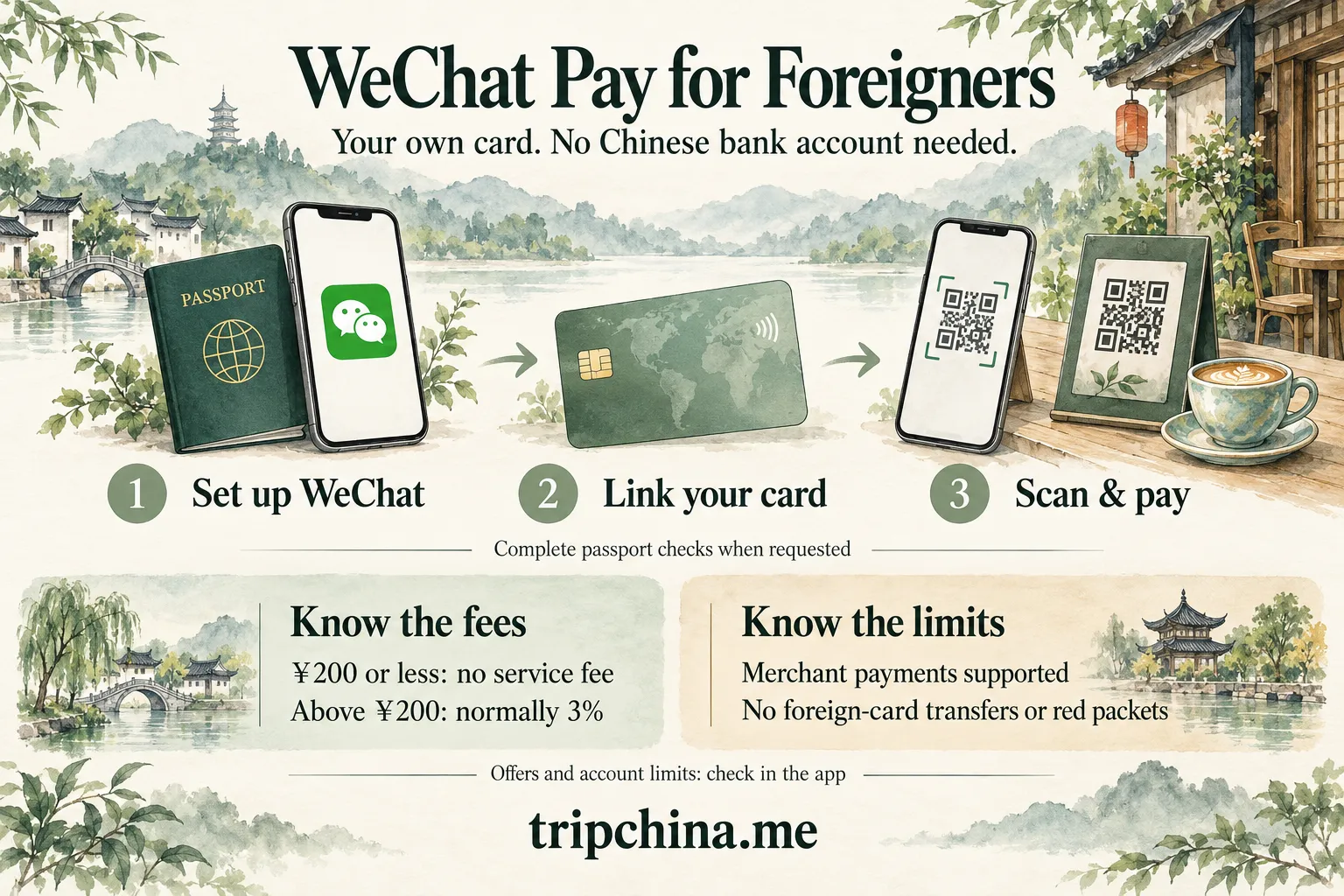
I strongly recommend doing the setup before you fly. Fixing a card-verification problem at home is much easier than doing it at a restaurant counter while someone is waiting for you to pay.
Prepare:
| What you need | Why |
|---|---|
| Valid passport | Used for identity verification when required |
| Overseas mobile number | Must be able to receive verification messages |
| Eligible international bank card | Visa and Mastercard are good first choices |
| Latest WeChat app | Older versions may show different menus |
| Stable internet connection | Helpful for identity and bank verification |
| Access to your banking app/SMS | Your bank may require a security check |
Before departure, also make sure your card is enabled for international transactions. A perfectly valid card can still be declined if your bank interprets the first China transaction as suspicious activity.
If you are still deciding how you will pay during the trip, see our comparison of WeChat Pay, Alipay, cards and cash.
On iPhone, use the App Store. On Android, use Google Play or another official distribution channel available to you.
Do this before departure when possible. You do not want app installation or account recovery to become another problem after landing.
Open WeChat and:
Your WeChat account password and your six-digit payment PIN are separate credentials. Complete any additional account-security checks shown during registration; SMS verification is not always the only step.
Depending on your account and the functions you are activating, WeChat may ask for identity information. Card linking and identity checks may appear in a different order; follow the prompts in your version of the app.
The usual route is:
Me → Services → Wallet → Identity Information / Identity Verification
Choose Passport when offered, enter the required information and upload a clear passport image if requested.
You may also be asked to complete facial verification.
For the best chance of passing the review:
Verification may be fast, but additional review can take longer. Do not leave this until you are standing at the airport taxi queue.
Go to:
Me → Services → Wallet → Bank Cards / Cards → Add a Card
Enter:
Your issuing bank may then ask you to approve the card through SMS, its banking app or another authentication method. Set a six-digit payment PIN when prompted. Menu names can vary by app version and account.
If the card fails at this stage, do not keep submitting it repeatedly. First check your name, card information and bank permissions.
WeChat Pay supports several major international card networks. Availability can vary by card issuer, card product and account.
| Card network | General status |
|---|---|
| Visa | Supported |
| Mastercard | Supported |
| American Express | Supported |
| JCB | Supported |
| Discover | Supported |
| Diners Club | Supported |
| UnionPay International | Supported in applicable cases |
Do not confuse “supported card network” with “every card issued on that network will work.”
A Visa card, for example, can still fail because the issuing bank blocks the linkage, the card product is not eligible, the account information does not match, or WeChat’s risk controls reject the transaction.
Standard personal credit or debit cards from established issuers are generally the safest choice. Prepaid, disposable and some virtual cards can be less predictable, so carry a second physical card rather than depending on one card.
There are two payment flows you will use again and again.
This is common at restaurants, cafés, small stores and street-food stalls.
Open:
WeChat → + → Scan
Then:
One practical habit matters: always look at the merchant name before pressing Pay. When several QR codes are sitting next to each other at a counter, it is surprisingly easy to scan the wrong one.
Supermarkets, convenience stores and larger chains often use the opposite system.
Open the payment-code function inside WeChat Pay and show the dynamic payment code to the cashier. The merchant scans it and the payment is processed using your selected payment method.
Do not send screenshots of your live payment code to strangers.
As of September 2026, the standard international-card service-fee structure is straightforward:
| Transaction | WeChat Pay service fee |
|---|---|
| ¥200 or less | Waived |
| Above ¥200 | Normally 3% of the full transaction amount |
| Partial/full refund | Relevant service fee is returned proportionally |
For example, a ¥300 purchase normally carries a ¥9 service fee before any applicable promotion. The 3% applies to the full ¥300, not just the amount above ¥200.
This is the WeChat Pay service fee. Your own bank or card issuer may separately impose a foreign-transaction or currency-conversion charge.
There is an important temporary benefit in 2026.
From May 27 through December 31, 2026, users who link an international bank card to WeChat for the first time can, after completing their first purchase, receive a 3% transaction-fee waiver for 90 consecutive calendar days on eligible spending within the promotional daily allowance of ¥1,000.
The daily cap matters: This is not unlimited fee-free spending for 90 days. Spending outside the ¥1,000 daily promotional allowance may still attract the standard fee. Check the checkout calculation if a purchase takes you over the allowance.
Promotion eligibility, covered transactions, the daily allowance and your offer’s expiry are subject to the rules displayed in your WeChat account. Do not assume that every purchase qualifies or that an offer activated late in the year automatically continues into 2027.
This means the older advice to “keep every payment under ¥200 to avoid the 3% fee” is incomplete for an eligible new user in 2026.
Tencent’s April 12, 2024 announcement gives verified international users ceilings of up to US$5,000 per transaction and US$50,000 per year. These are published maximums, not guaranteed allowances for every linked card.
| Account / limit type | What to expect |
|---|---|
| Simplified card linking | Limited spending may be available before full identity verification; follow your account’s prompts |
| Verified international user: single transaction | Up to US$5,000, according to Tencent’s published announcement |
| Verified international user: annual total | Up to US$50,000, according to the same announcement |
| Monthly allowance and remaining quota | Check the applicable account or card limit inside WeChat; do not assume one universal monthly figure |
The RMB figures quoted in older guides should not be treated as a separate, universally applicable “basic passport verification” tier. Completing the requested checks may raise your allowance, but the amount available to you still depends on your account and card.
Before a large hotel bill or shopping purchase, check any limit notice in Wallet or the payment screen. If the allowance is unclear, ask in-app support before relying on it. Your bank can also decline a payment below WeChat’s displayed limit.
Do not try to bypass account controls by creating questionable accounts or using someone else’s identity.
Instead:
For normal tourist spending, most travelers are unlikely to approach the higher verified-user limits.
You normally pay the merchant in Chinese yuan, while your international card ultimately settles the charge according to the card network and issuing bank’s foreign-exchange process.
In other words, there is no need to manually convert dollars, euros or pounds into RMB inside WeChat before every purchase.
However, “automatic conversion” does not mean “no foreign-exchange cost.”
Your issuing bank may apply:
Check your card’s overseas-purchase policy before traveling. The final home-currency amount on your card statement may therefore differ slightly between cards even when the RMB purchase price is identical.
The easiest way to understand an international card linked to WeChat Pay is this:
It is mainly a payment tool, not a replacement for a Chinese bank account.
| Feature | Foreign-card use |
|---|---|
| Pay merchants | Yes |
| Restaurants and cafés | Yes |
| Shops and supermarkets | Yes |
| Taxi / ride payments | Generally yes where the operator and checkout support your card |
| Hotel and attraction payments | Generally yes where supported |
| Eligible Mini Program purchases | Often |
| Public-transport payments | Only where the local transit service accepts your linked card; separate activation may be required |
| Top up WeChat balance | Generally not supported with foreign cards |
| Send ordinary person-to-person transfers | Not supported through the linked foreign card |
| Send red envelopes using the foreign card | Not supported |
| Wealth-management products | Not a normal tourist function |
Merchant QR code or personal transfer? A QR code that opens a person-to-person transfer may not accept your linked foreign card. Ask whether the seller has a merchant payment code, or use another accepted payment method.
This distinction matters when a Chinese friend says, “Just send me the money on WeChat.”
A linked international card is not equivalent to having a mainland Chinese WeChat Pay wallet funded by a Chinese bank account. It is designed primarily for eligible consumer payments. For ride booking and pickup instructions, see how to use DiDi with an overseas phone number.
In many Chinese cities, WeChat provides transport-related Mini Programs, transit codes or local transport services, but availability and foreign-card compatibility can vary by city.
A common route is:
Me → Services → Transport
Then:
Some systems use a city-specific Mini Program with separate identity and payment requirements. A foreign card that works in a café may not be available for transit-code activation or fare deductions.
The ordinary WeChat payment code is not a universal metro ticket. Activate the correct transit code before joining the gate queue. If your card is unsupported, use another ticketing method accepted by that transport operator.
For city-specific instructions, TripChina also has detailed guides such as paying for the Beijing subway, using Shanghai’s metro and buses, and riding the Xi’an metro.
This is one of the most common problems foreign visitors encounter.
Enter your passport name in the identity fields and the cardholder details requested for your bank card. Avoid nicknames and check surname order, middle names and spelling.
A shortened name printed on a physical card does not automatically mean the card is unusable. The bank’s underlying records and the app’s field requirements matter. If verification fails, check with the issuer or WeChat support rather than inventing a different spelling.
Your bank may treat a China-based card-linking request or first mobile-wallet purchase as suspicious.
Before departure, make sure:
If the card is declined, contact the issuer before repeatedly retrying.
Some prepaid, virtual or disposable cards may fail even when their card network is nominally supported.
That does not mean every virtual card is categorically banned. Compatibility depends on the issuer, card product, authentication and risk controls.
First check the image rather than repeatedly resubmitting the same photo.
Make sure:
If verification remains stuck or WeChat places an account-level restriction on the payment service, use the official Help & Feedback / customer-service options inside WeChat rather than third-party “verification services.”
Successfully linking a card does not guarantee every transaction will be approved.
A payment may fail because of:
Try another legitimate payment method rather than repeatedly forcing the same transaction.
This is why I recommend having both WeChat Pay and Alipay ready. Follow the Alipay setup steps for foreign visitors to prepare a second payment option. The platforms have separate acceptance and risk controls, so a rejection in one does not necessarily mean the other will fail.
My preferred setup is deliberately redundant. You do not want one failed card or one app problem to control your trip.
Before departure:
Also make sure you will have internet access immediately after landing. Do not rely on QR payments without a working data connection.
If connectivity is still unresolved, see how to restore internet access after landing or compare your options in our China eSIM and SIM card comparison.
Often, yes, provided the card is supported by both platforms and your issuing bank approves both wallet connections. Your bank can still apply separate fraud controls to each service, so linking successfully to one app does not guarantee approval in the other.
Secure the WeChat account and linked card as quickly as possible, and contact your card issuer if you cannot regain control of the device. Keep your bank’s international support number and account-recovery information somewhere other than the phone itself.
Do not plan your trip around sharing one account. WeChat accounts, identity verification and payment risk controls are tied to the account holder, so each adult traveler is better off setting up their own account and payment method.
Tencent’s simplified card-linking process allows limited spending before full identity checks in eligible cases. This is not a guarantee that every new account can pay without a passport check. Complete verification whenever the app requests it, especially before a larger purchase.
Do not assume so. Check the offer terms and the fee shown before confirming payment. A merchant accepting WeChat Pay does not, by itself, establish that your transaction qualifies for the promotion.
Reviewed September 30, 2026 against Tencent and Tenpay publications. This guide distinguishes published verified-user ceilings from individual account allowances and uses the May 2026 announcement for the current promotion. App menus, card eligibility and verification requirements can vary. Check your account, checkout screen and card issuer for the terms applying to your payment. This is independent TripChina editorial guidance, not official Tencent documentation or a guarantee of payment approval.
TripChina.me creates practical China travel guides shaped by real local experience, helping independent travelers navigate transport, payments, food, neighborhoods, and the cultural details that make traveling in China easier and more meaningful. Find the guide for your destination at tripchina.me.