Our Location:
No. 99, Jiazi Road, Chengdu

 authorChris Lee
Using DiDi in China is easier for international travelers than many first-time visitors expect. You do not normally need a Chinese phone number or bank account just to book a ride.
This guide shows you which DiDi app to use, how to set up payment, and how to book your first ride. It also explains the part that can be confusing at airports and train stations: finding the right pickup point and meeting your driver.
Yes. As of September 2026, foreign travelers can use DiDi in mainland China without buying a Chinese SIM card.
Current Chinese government guidance states that DiDi-Greater China supports registration with foreign mobile phone numbers and international credit cards. Foreign visitors can also access online ride-hailing through Alipay and WeChat.
For most travelers:
Current official DiDi app information also confirms an English interface, global mobile-number login, bilingual in-app messaging, international bank-card support and in-app English customer service.
TripChina Local Tip: Set up DiDi before departure. The app itself is rarely the hardest part; trying to solve an SMS or card problem while standing outside an airport with luggage is.
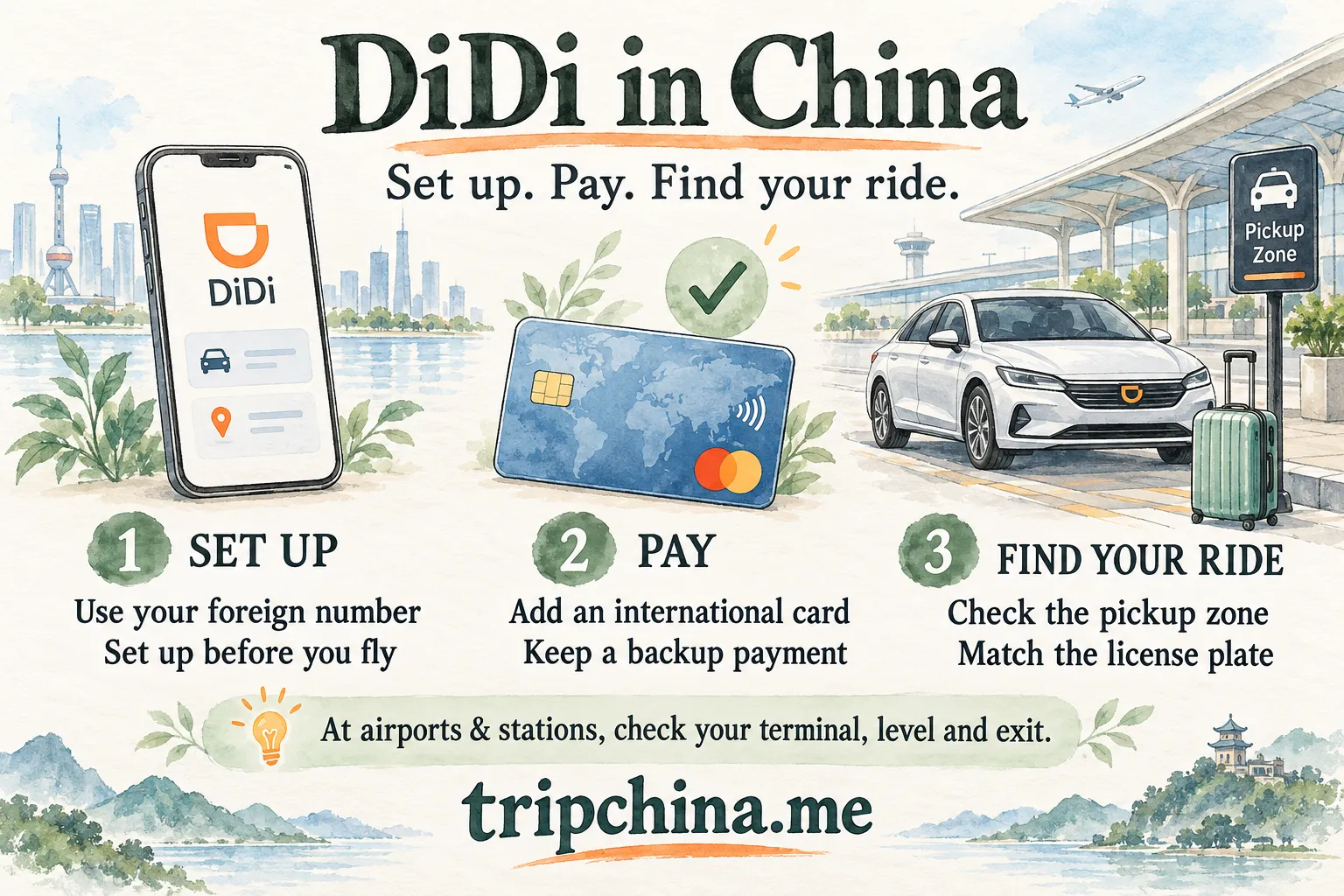
As of September 2026, official guidance lists DiDi-Greater China, Alipay and WeChat as ways foreign travelers can book online ride-hailing services.
| Option | Foreign Number | International Payment | Separate DiDi App? | Best For |
|---|---|---|---|---|
| DiDi-Greater China | Supported | International credit cards supported | Yes | Travelers taking several rides |
| Alipay ride-hailing | Uses Alipay account | Depends on Alipay payment setup | No | Travelers already using Alipay |
| WeChat ride-hailing | Uses WeChat account | Depends on payment setup | No | Useful backup |
| Traditional taxi | Not required | Payment options vary | No | When app pickup is inconvenient |
Which should you choose? If you already have Alipay set up, check its ride-hailing option first—you may not need another app. Choose DiDi China if you prefer a dedicated ride-hailing app. Before relying on either, check that you can sign in and access your intended payment method.
For the wider digital setup you'll need in China, see TripChina's Essential Apps for Foreigners in China.
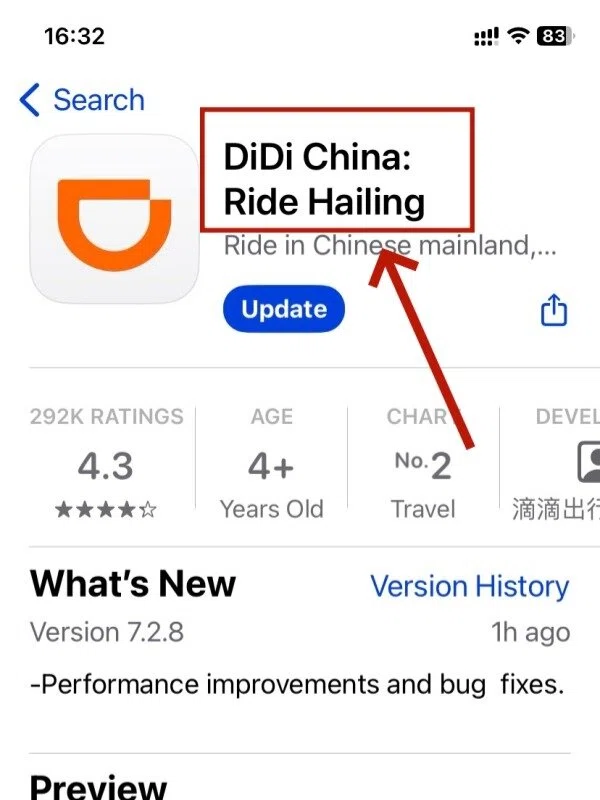
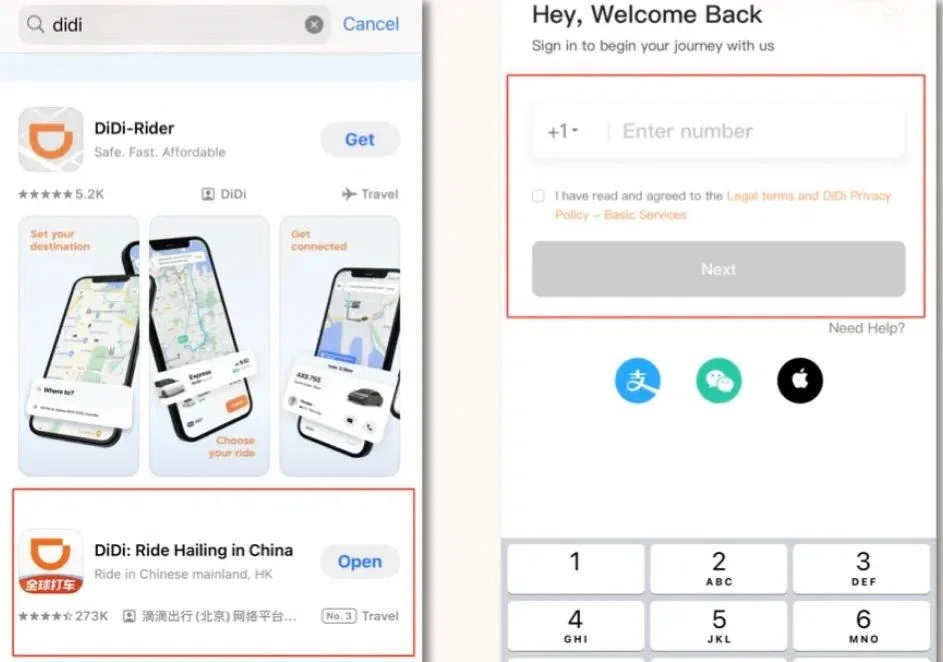
For mainland China, the clearest choice is DiDi China: Ride Hailing / DiDi-Greater China, the mainland service referenced in current Chinese government guidance.
Look for the mainland-China service, with English-language support and international-user registration.
Other DiDi-branded apps serve different markets. Check that the app you download supports rides in mainland China.
Yes.
Current government instructions also list two useful alternatives:
Alipay: Open Alipay → Transport → Taxi → enter your pickup location and destination.
WeChat: Open WeChat → Me → Services → Mobility / Ride Hailing → enter your pickup location and destination.
Exact labels can change as the apps update, so treat these paths as guidance rather than permanent button-by-button instructions.
This is particularly useful if you already have Alipay set up for everyday payments and do not want another travel app.
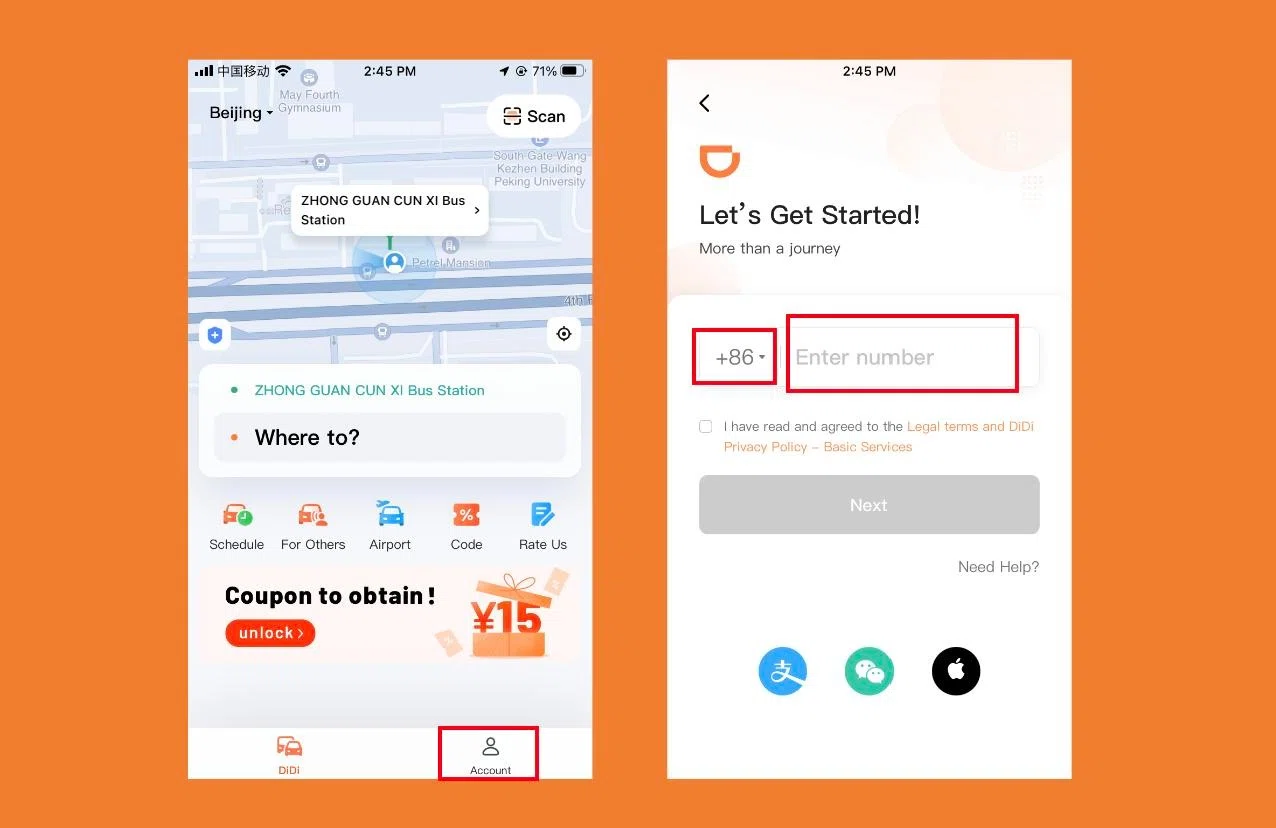
You do not need a Chinese number simply to register for DiDi-Greater China.
A typical setup is:
Examples of international dialing codes include:
Select the country code for the phone number you are registering with, not China’s +86 unless you are using a Chinese number.
Yes. Sign in, check the language settings, add your intended payment method, and complete any verification requested by the app before departure. This gives you time to troubleshoot without depending on an airport connection.
First check:
Avoid requesting verification codes repeatedly in rapid succession.
If standalone DiDi registration still does not work, try ride-hailing through Alipay or WeChat rather than making your airport transfer dependent on one unresolved app.
Using a data-only travel eSIM? Internet access and SMS verification are separate. Make sure the number registered with DiDi can receive verification texts if you need to sign in again. A data-only eSIM does not provide SMS service for your existing number.
Yes.
As of September 2026, DiDi's official app information advertises an English interface for inbound travelers, global mobile-number login and bilingual English-Chinese messaging between riders and drivers.
If you access ride-hailing through Alipay or WeChat, the surrounding interface may depend on the language settings and current version of the host app.
TripChina Tip: Don't memorize screenshots from a months-old tutorial. Chinese apps change frequently. Learn what the functions are—Language, Payment, Trips, Messages and Help—rather than depending on an exact screen layout.
Your account may ask for identity or real-name verification, depending on the current account flow, payment setup or risk controls.
Do not assume that every foreign tourist must upload a passport before every normal ride, and do not rely on claims that a passport is always the only document accepted.
If verification appears, follow the current international-user document options shown inside your account.
TripChina Recommendation: Complete any requested verification before your first airport or railway-station transfer rather than waiting until you actually need the car.
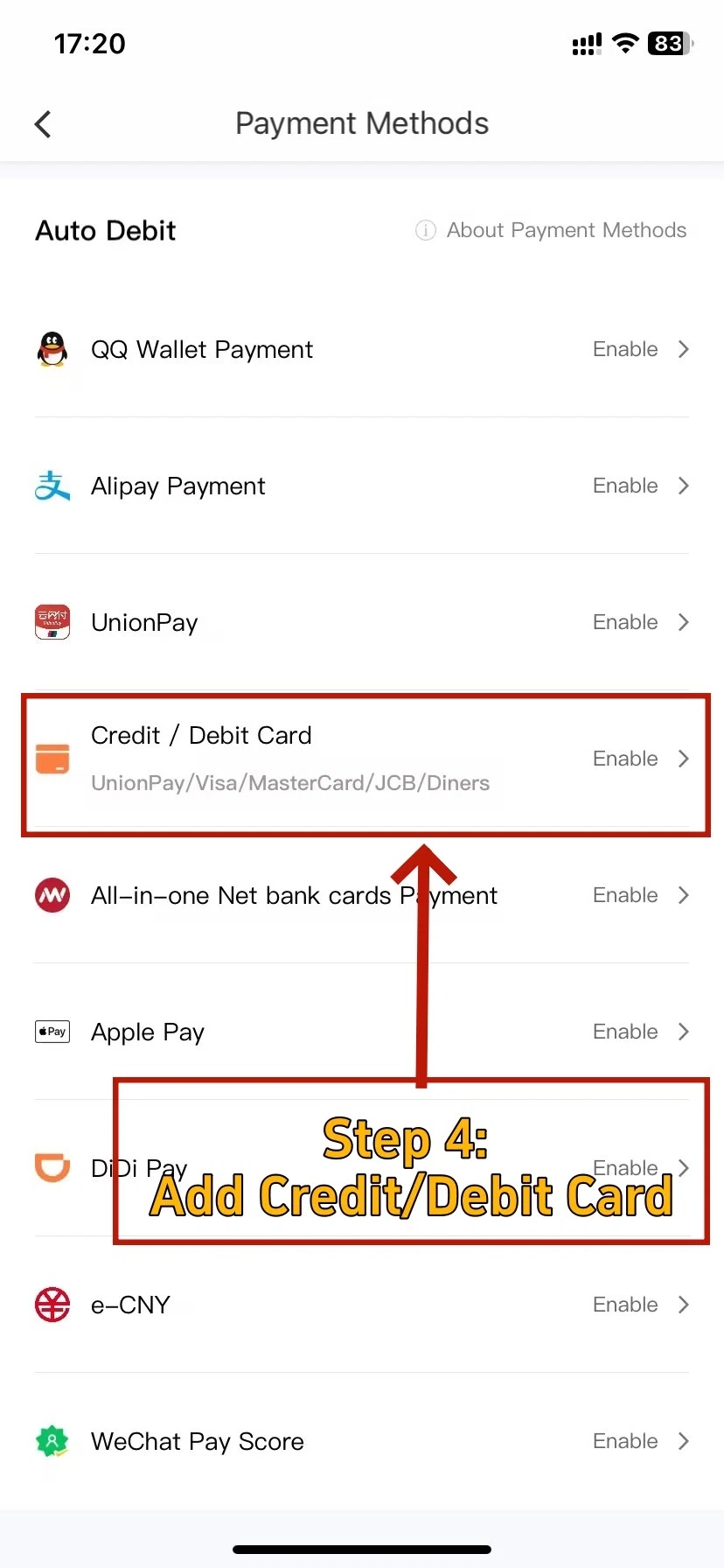
As of September 2026, Chinese government guidance states that DiDi-Greater China supports international credit cards, while current DiDi app information describes support for international bank cards.
You therefore do not normally need to open a mainland Chinese bank account simply to use DiDi.
Actual payment success can still depend on:
Officially supported does not mean every foreign card will work every time.
| Payment Method | Good for Tourists? | Main Advantage | Possible Issue |
|---|---|---|---|
| International card in DiDi | Yes | Direct and simple | Issuer may decline transaction |
| Alipay + overseas card | Yes | Useful throughout China | Requires Alipay setup |
| WeChat Pay + overseas card | Yes | Useful beyond transportation | Setup can vary |
| Cash | Backup outside app | Useful for some taxis | Don't assume every app ride supports it |
A practical backup chain is:
DiDi + international card → Alipay → second international card
Prepare a payment backup. Keep a second card available and, if you use Alipay, check its payment setup before you need a ride. Switching apps may not solve the problem if the same card is being declined by your bank.
Do not assume cash will be available for every app-booked ride.
Use the payment options displayed for the specific order in your app. Traditional street taxis may have different payment options.
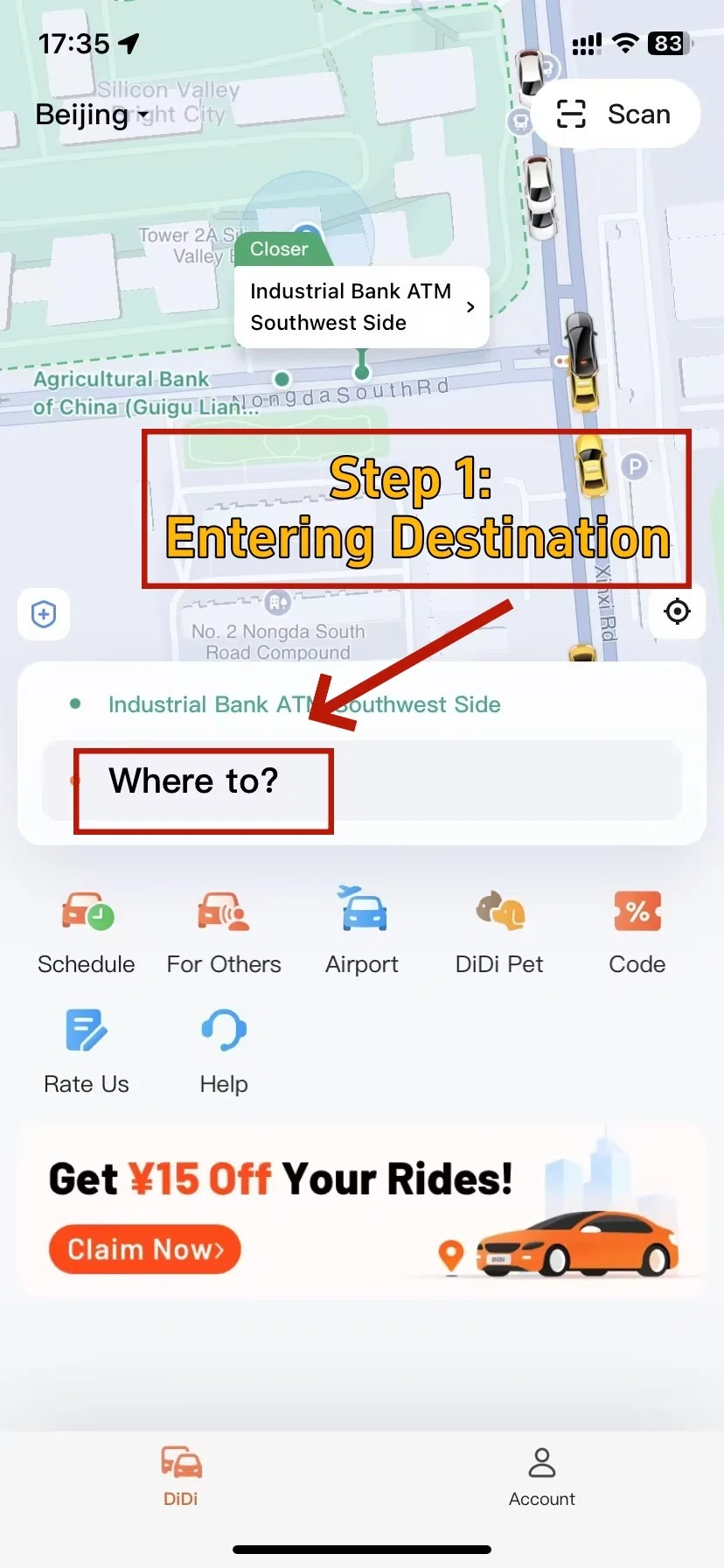
The two details worth checking most carefully are your pickup point and destination.
DiDi uses your location to suggest a pickup point, but the automatically selected pin is not necessarily somewhere a driver can conveniently or legally stop.
This matters especially at:
Whenever possible, choose a clearly marked pickup point.
Search for your hotel, attraction, airport or railway station and compare the result with the map before confirming.
If the English name does not produce the correct location, try:
Local habit worth copying: Save the Chinese name and address of your hotel on your phone before arrival. It can solve problems not only with DiDi, but also with taxis and directions.
For navigation beyond ride-hailing, see TripChina's China Navigation App Guide.
Current government guidance lists Express, Taxi, Premier and Luxe among the available service options. Availability can vary by city, location and time.
| Ride Type | Best For | Relative Cost | TripChina Recommendation |
|---|---|---|---|
| Express (快车) | Everyday city rides | $ | Best default |
| Taxi (出租车) | Taxi service booked through platform | $–$$ | Useful alternative |
| Premier (专车) | Comfort, airport or luggage | $$ | Consider with several bags |
| Luxe (豪华车) | Premium travel | $$$ | Usually unnecessary for sightseeing |
Traveling with luggage? Express is a practical starting point for ordinary city rides. For several passengers or large suitcases, check the vehicle capacity and available larger options. A higher-priced category does not automatically mean more seats or luggage space.
If the vehicle does not match the booking, don't get in simply because someone says they are your driver.
This is where DiDi becomes more confusing.
Many large Chinese airports use designated online ride-hailing pickup areas, and your driver may not be able to stop directly outside your arrivals door.
The exact arrangement varies by airport and terminal, so follow local signs and the pickup information shown in your app rather than assuming every airport works identically.
A practical workflow is:
TripChina Local Tip: Don't request the car while you're still waiting at baggage claim unless you know the airport's pickup system well. Immigration, luggage and the walk to the ride-hailing area make your timing unpredictable.
Major Chinese cities may have:
The terminal and pickup zone often matter more than the airport name.
For the full arrival process before you even reach the pickup area, see TripChina's China Airport Arrival Guide for Foreigners.
High-speed railway stations can be even more confusing than airports.
Large stations may have:
Before requesting your DiDi, answer one question:
Which exit are you actually standing near?
TripChina Local Tip: At a huge Chinese railway station, knowing your exact exit often saves more time than anything you type into the app.
If your designated pickup point is elsewhere in the station, walk there first and request the car once you are close.
For the rest of the railway experience—from station entry to boarding—see TripChina's China Train Travel Guide for Foreign Visitors.
Many DiDi drivers will not speak fluent English.
In practice, this is usually manageable because your destination and pickup point are transmitted digitally.
As of September 2026, DiDi officially advertises bilingual Chinese-English in-app messaging.
Keep messages short:
Don't panic.
The driver may be trying to locate you. If speaking is difficult, open the trip’s messaging function and send a short, specific location such as “I’m at Exit 3” or “I’m in pickup zone B.”
Check that you are standing at the pickup point shown in the booking. An exact exit or zone is more useful than simply saying “I’m at the airport.”
DiDi provides digital booking and journey information, but normal ride-hailing precautions still matter.
Match the license plate and vehicle information with the booking.
Don't enter an unmatched vehicle.
Yes.
Look at the map before the car starts moving, particularly when hotels, railway stations or attractions have similar English names.
Keep payment within the booking flow whenever possible.
If you're unexpectedly asked to make another payment, check your trip and payment status first so you don't accidentally pay twice.
Keep your phone charged. You may need it to find the pickup point, message your driver and check payment. Carry a power bank and save your hotel’s Chinese address before heading out.
Check whether:
A card being officially supported does not mean every transaction will be approved.
If necessary, switch to your backup payment or ride-hailing method.
Request another car.
Cancellations may occur during rush hour, heavy rain, holidays, large events or difficult pickup situations.
If it happens repeatedly, try moving to a clearer pickup point or selecting another available ride category.
Open your trip history and select the completed journey.
Look for the current options to:
Do it as soon as possible.
As of September 2026, DiDi's official website lists the passenger service hotline as +86 400 0000 999, while current app information advertises in-app English customer service.
For most foreign visitors, the in-app route is the easier first step.
For many international travelers, DiDi's biggest advantage isn't necessarily price.
It's that you enter the destination before the ride begins.
| Feature | DiDi | Street Taxi |
|---|---|---|
| Destination entered digitally | Yes | Usually tell/show driver |
| Foreign phone supported | Yes | Not required |
| International card support | Officially documented | Varies |
| Vehicle details stored digitally | Yes | Less convenient |
| Spoken Chinese needed | Usually little | More useful |
| Pickup | App-designated point | Taxi rank/street where permitted |
The two are complementary.
A traditional taxi can actually be easier when:
Don't turn “DiDi vs taxi” into a rule. Use whichever makes more sense where you're standing.
Do not plan your mainland-China transportation around Uber.
For practical trip planning, use China's domestic ride-hailing ecosystem, especially DiDi, plus taxis and public transportation where appropriate.
Generally, one traveler can request a vehicle for their travel party as long as the passengers and luggage fit the selected vehicle.
You do not normally need a separate DiDi account for every person simply because everyone is riding together. For larger groups, check the vehicle options shown in the app.
Availability is generally much better in cities and populated tourist areas.
In remote mountain regions, villages and isolated scenic areas, don't assume you'll be able to summon a car for the return trip. Ask your hotel or attraction about taxis, buses or transfers before relying on DiDi.
Scheduled or reservation options may appear for eligible services, locations and accounts.
Check the current app for your specific route rather than assuming advance booking is always available. A scheduled ride should still be treated as a convenience rather than a guarantee against traffic, driver shortages or pickup changes.
Longer rides may appear depending on your location and the services available, but ride-hailing is not automatically the best option between major Chinese cities.
For most intercity routes, high-speed rail is usually faster and more predictable. DiDi is often most useful for the first and last mile—for example, hotel → railway station and railway station → hotel.
Prices and availability can vary with route, demand, traffic, time and service type.
Check the estimated fare shown before confirming rather than relying on a fixed “normal” price from an old travel blog.
That's enough for most travelers to use DiDi confidently without turning a simple ride into another piece of China-trip homework.
Before your first ride, check your account, payment method and mobile connection. At pickup, confirm the location and license plate. Keep a backup way to travel in case the app, card or connection fails.
State Council of the People's Republic of China — Guide to Working and Living in China
Hunan Provincial Government — How to Book Online Ride-Hailing Services
This guide was checked against current Chinese government transportation guidance and DiDi's official information. Foreign-number registration, international-card support, English functionality, bilingual messaging and Alipay/WeChat ride-hailing access were verified against current sources. Practical airport, railway-station and troubleshooting recommendations reflect TripChina's traveler-focused planning approach. App interfaces, payment approval, ride categories and local pickup arrangements can change, so travelers should follow current in-app and on-site instructions.
👉 Explore more essential travel tips in our China Basics Hub.
TripChina.me creates practical China travel guides shaped by real local experience, helping independent travelers navigate transport, payments, food, neighborhoods, and the cultural details that make traveling in China easier and more meaningful. Find the guide for your destination at tripchina.me.